What Are Core Web Vitals? How They Impact Your Website’s SEO Performance

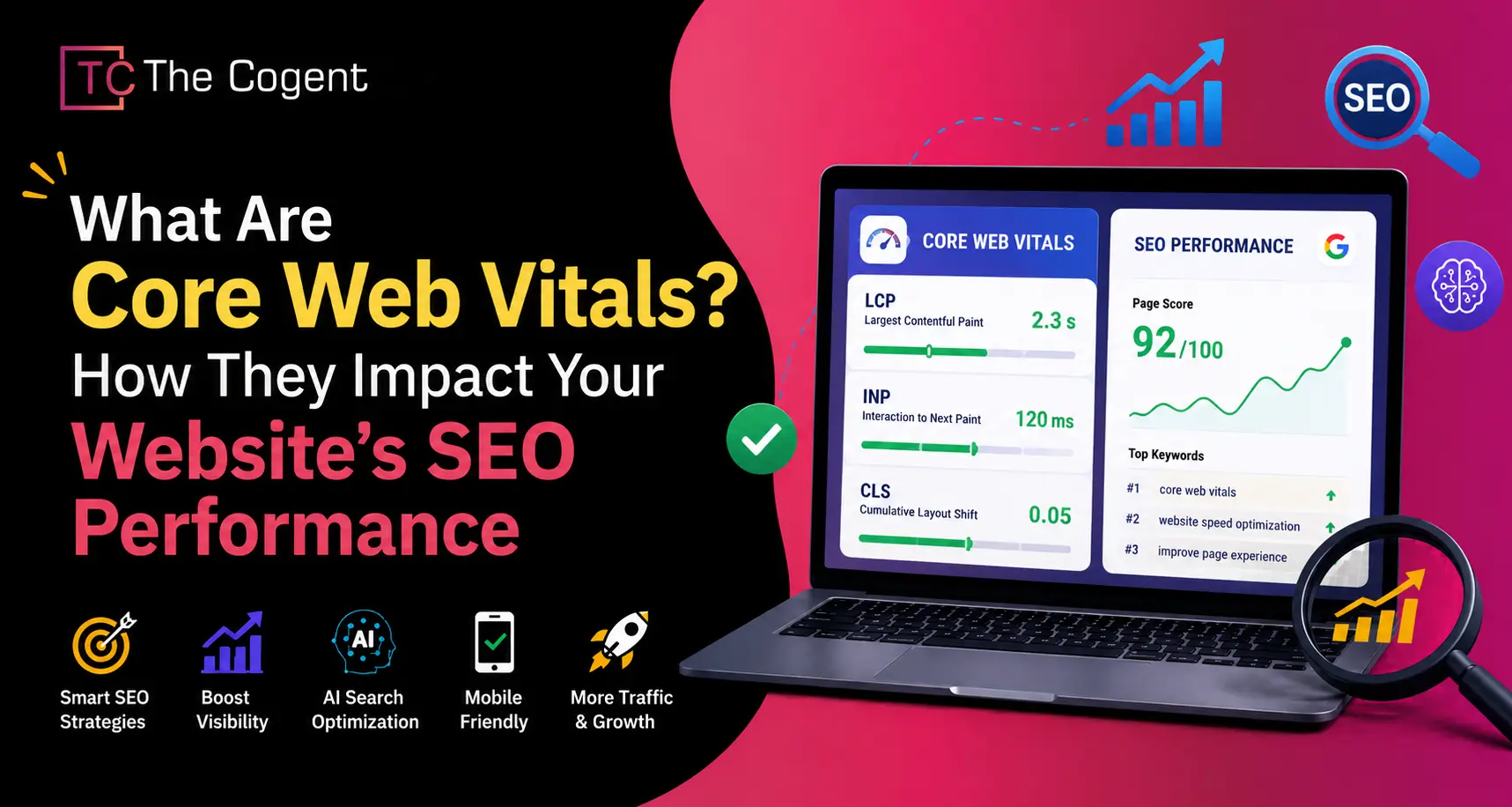
Why are some websites losing rankings even after publishing high-quality content? Why do users leave a website within seconds despite good products and strong SEO efforts? In many cases, the real issue is not the content itself but poor user experience signals measured through core web vitals. An entrepreneur may spend months producing blogs, improving product descriptions, building backlinks, and optimizing webpages – only to see traffic drop while competitors with weaker content start outranking them.
Google now uses Core Web Vitals as a real-user measurement system to evaluate how fast, stable, and interactive a website feels during browsing. Slow loading pages, delayed button responses, and unstable layouts frustrate users and reduce trust, especially on mobile devices, where browsing expectations are higher than ever in 2026. As a result, businesses experience lower engagement, weaker conversions, and declining search visibility. Understanding how Google Core Web Vitals work is now essential for improving both SEO performance and user experience.
What Are Core Web Vitals?
Core Web Vitals are Google’s standardized metrics used to measure real-user experience based on website loading speed, interactivity, and visual stability.
To understand the core Web Vitals meaning in simple terms, these metrics help Google determine whether a website feels fast, responsive, and user-friendly for real visitors across both mobile devices and desktops. Instead of evaluating websites only through backlinks and keywords, Google now also measures how comfortably users can interact with pages in real-world conditions. The primary focus of Google Core Web Vitals includes page loading speed, responsiveness to user interactions, and layout stability while content loads on the screen.
Google introduced the concept of Core Web Vitals in 2020 as part of its “Page Experience” initiative to encourage better website usability. In 2021, Core Web Vitals officially became a ranking factor in Google Search. By 2024, these metrics were deeply integrated into Google’s core algorithm systems rather than being treated as separate signals. According to industry observations and SEO studies, March 2026 marked an increased emphasis on real-user performance signals, mobile browsing experience, and user experience metrics within Google’s ranking systems. Google also explains in its official Core Web Vitals documentation that these metrics are designed to help website owners improve overall page experience and usability for real users.
The 3 Metrics at a Glance
Understanding what qualifies as a good core web vitals score helps businesses identify whether their website meets Google’s recommended performance benchmarks.
| Core Web Vital | What It Measures | Good Score | Needs Improvement | Poor Score |
| Largest Contentful Paint (LCP) | Measures how quickly the main content of a page loads | Under 2.5 seconds | 2.5s – 4s | Above 4s |
| Interaction to Next Paint (INP) | Measures how quickly a website responds to user interactions | Under 200 milliseconds | 200ms – 500ms | Above 500ms |
| Cumulative Layout Shift (CLS) | Measures visual stability and unexpected layout movement | Under 0.1 | 0.1 – 0.25 | Above 0.25 |
LCP, INP & CLS Explained – The 3 Core Web Vitals
LCP, INP, and CLS are the three key metrics that make up Google Core Web Vitals. They measure website loading speed, responsiveness, and visual stability to help evaluate real user experience and overall website performance.
LCP – Largest Contentful Paint (Loading)
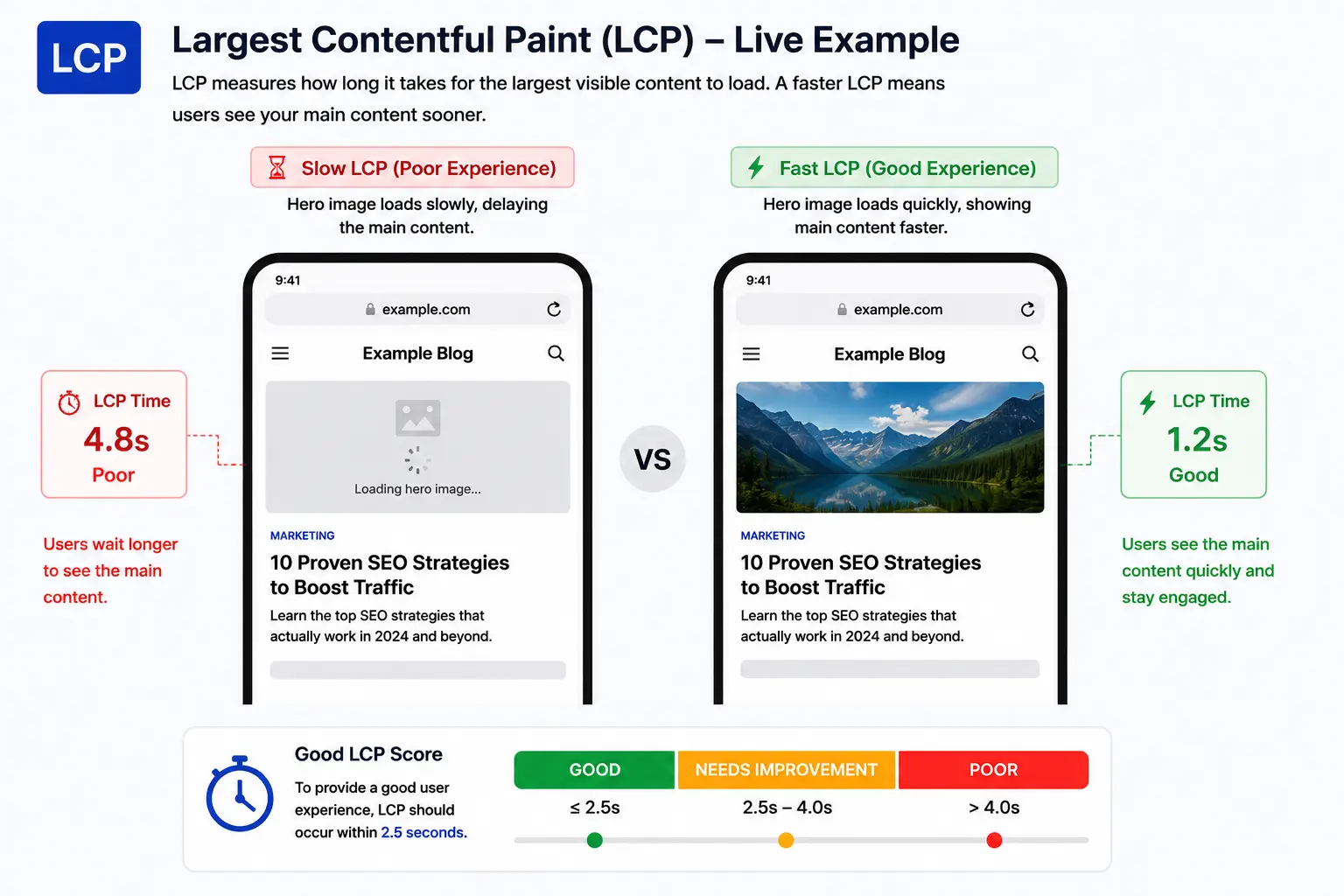
The Largest Contentful Paint (LCP) assesses the time taken for rendering the biggest piece of visual content on a website. Typically, the “largest content” refers to a hero image, banner, featured video, or large text block visible during page load.
To make this concept easier to understand, imagine visiting a store in darkness at night. As soon as the main lights turn on and help you clearly see the products inside the store, the store starts feeling open and ready. However, if the lights take too long to turn on, customers may become impatient and leave. Websites behave in a very similar way when pages take too long to load.
The most common reasons for poor LCP performance include:
- Poor server response times
- Heavy image and video assets
- Excessive JavaScript and CSS
- Too many third-party scripts and tracking tools
Improving LCP helps websites appear faster, increases user engagement, improves Core Web Vitals SEO performance, and enhances mobile browsing experience.
INP – Interaction to Next Paint (Responsiveness)
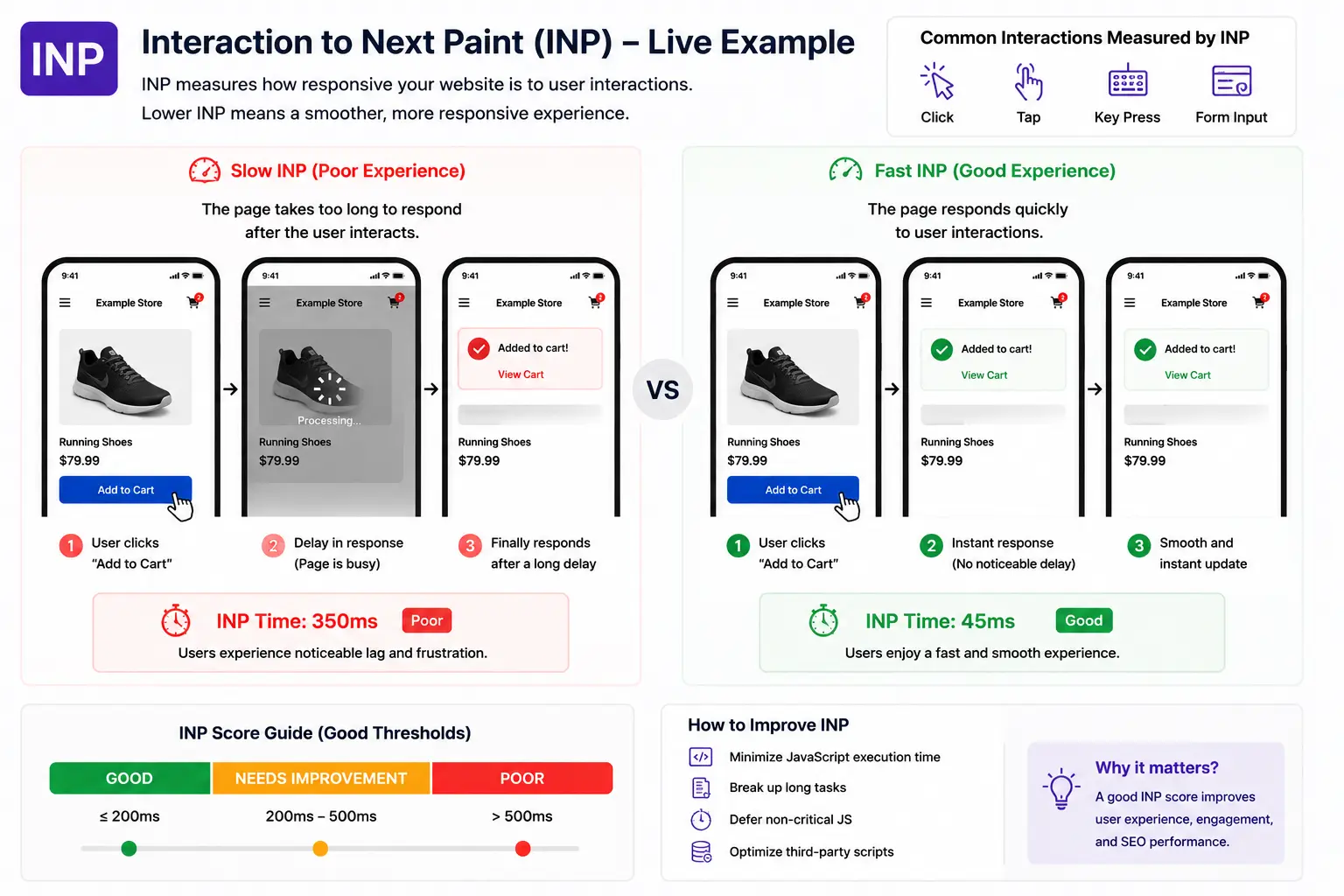
Interaction to Next Paint (INP) tracks how quickly a website responds after a user interacts with it. It measures the delay between a user action – such as clicking a button, opening a menu, or typing into a form – and the visible response shown on the screen.
A simple real-world example is pressing an elevator button. If the button lights up immediately, people understand the system is responding. But when nothing happens for several seconds, users often assume the button is not working. Websites behave in a very similar way.
In March 2024, Google officially replaced First Input Delay (FID) with INP as a Core Web Vital. While FID measured only the first interaction delay, INP evaluates responsiveness throughout the entire browsing session, helping Google better understand real user experience.
Common causes of poor INP scores include:
- Heavy JavaScript execution
- Too many third-party tracking scripts
- Complex frontend rendering and page interactions
Optimizing INP helps websites feel smoother, faster, and more interactive across both desktop and mobile devices.
CLS – Cumulative Layout Shift (Visual Stability)
CLS measures the visual stability of a webpage during loading. The score helps determine whether page elements unexpectedly move while users are trying to interact with content.
One common example is when users attempt to click the “Buy Now” button, but the button suddenly shifts downward because an ad or image loads late. As a result, users accidentally click something else, creating frustration and reducing trust in the website.
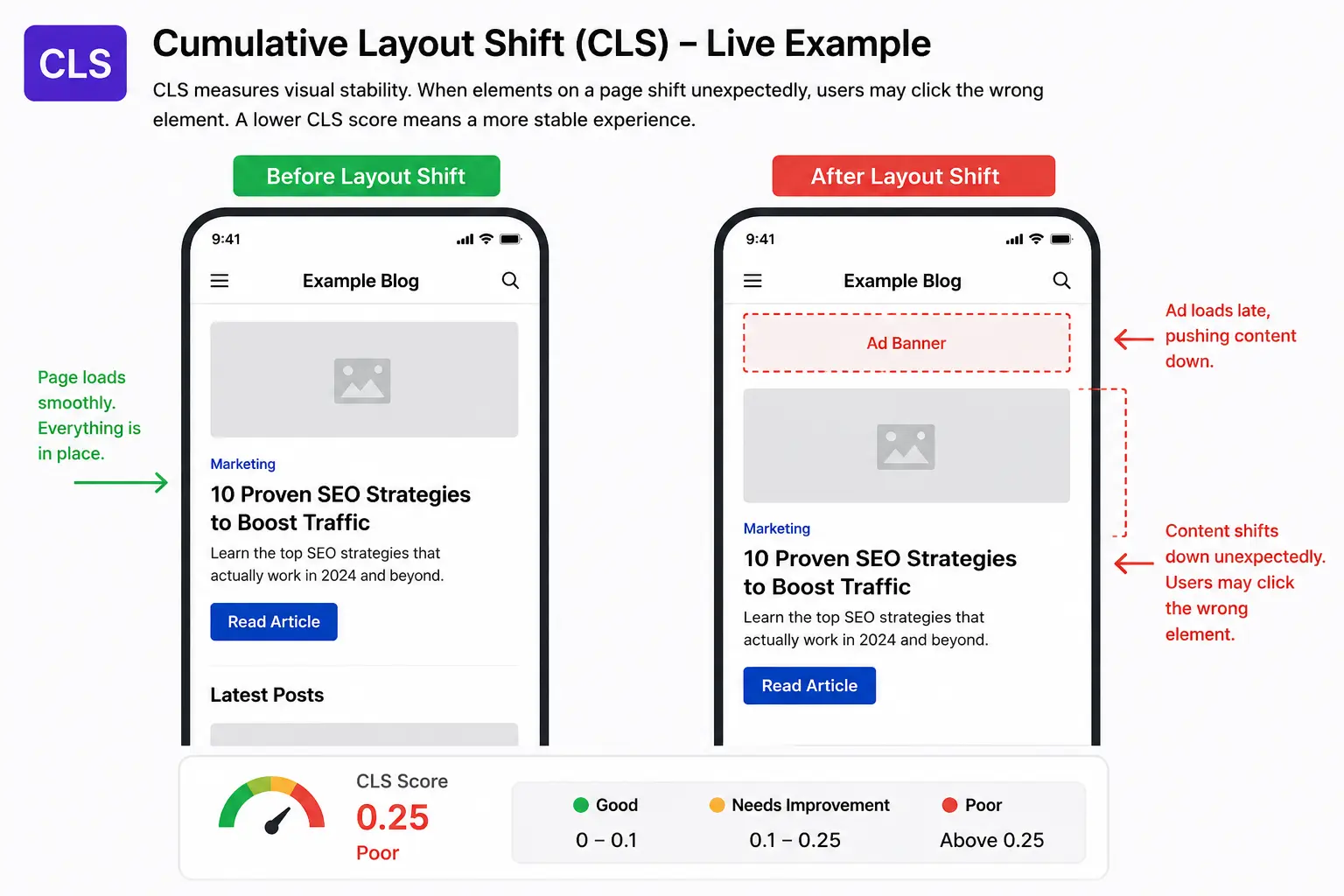
Common causes of poor CLS performance include:
- Images or videos without defined dimensions
- Dynamic ads, banners, or popups
- Text shifting caused by web fonts
- Delayed loading of maps, iframes, or embedded content
Having a good CLS score improves user trust, creates a more professional browsing experience, and prevents accidental clicks caused by unstable layouts.
What’s New in 2026 – VSI (Visual Stability Index)
Visual Stability Index (VSI) is an emerging user experience metric in 2026 that expands on the concept of CLS by measuring layout stability throughout the entire browsing session instead of focusing only on page load shifts.
The biggest difference with VSI is that it considers user intent. Predictable movements triggered by users – such as opening a dropdown menu, expanding an FAQ section, or interacting with a carousel – are generally not treated as negative because users expect those actions. However, unexpected layout shifts caused by popup banners, delayed advertisements, sticky elements, or dynamically injected content are considered poor user experience signals.
This shift shows that Google is increasingly prioritizing real-world browsing experience and user behavior rather than relying only on technical performance metrics.
H2: How Core Web Vitals Affect Your Google Rankings & Business
Since Google now uses mobile-first indexing, website performance on mobile devices has become far more important for rankings, usability, and conversions. Today, Core Web Vitals are not just technical SEO metrics – they directly influence rankings, user engagement, conversions, and overall business performance. Google increasingly prioritizes websites that provide faster loading speeds, smoother interactions, and stable mobile browsing experiences because users have very little tolerance for slow or frustrating pages.
Industry insights shared through Google’s Core Web Vitals learning resources show that websites with stronger page experience signals generally perform better in terms of engagement and usability. Research and ranking analysis also suggest that pages appearing in top Google positions tend to have noticeably better Core Web Vitals pass rates compared to lower-ranking pages.
Website speed has a direct impact on user behavior. Studies referenced in Google’s page experience research indicate that websites loading in around 2 seconds experience much lower bounce rates compared to pages taking 5 seconds or longer to load. Even a one-second delay in loading speed can reduce conversions and weaken user trust, especially on e-commerce and lead-generation websites. Faster loading pages and smoother mobile experiences have become essential for online stores, especially for businesses following modern ecommerce SEO guide strategies focused on improving rankings and conversions.
Mobile browsing has become even more important in 2026, with more than 60% of searches now happening on mobile devices. Google also reports that over half of mobile users leave websites that take longer than 3 seconds to load, making mobile-first performance optimization essential for modern SEO success.
Slow websites don’t just hurt rankings – they silently reduce engagement, trust, leads, and revenue with every additional second of delay.
Businesses that improve their Core Web Vitals often experience lower bounce rates, better engagement, and stronger conversions. Many also work with the best SEO company to strengthen technical SEO, website performance, and long-term organic growth.
Real-World Core Web Vitals Case Studies
Many businesses have already seen measurable improvements in rankings, engagement, and conversions after optimizing their Core Web Vitals. Here are some real-world examples published by Google’s web.dev platform.
Vodafone: Faster LCP Improved Sales Performance
According to Vodafone’s Core Web Vitals case study on web.dev, the company discovered that improving Largest Contentful Paint (LCP) by 31% had a direct impact on business growth. After optimizing their landing page performance and Web Vitals experience, Vodafone achieved an 8% increase in total sales, a 15% improvement in lead-to-visit rate, and an 11% uplift in cart-to-visit rate. The study clearly highlights how faster loading experiences can positively influence both user engagement and revenue generation.
Agrofy: Better Core Web Vitals Reduced User Abandonment
As highlighted in Agrofy’s Core Web Vitals optimization case study, the company achieved a 70% improvement in LCP and a 72% improvement in CLS after refactoring and optimizing its platform. These performance improvements correlated with a remarkable 76% reduction in load abandonment rates. By focusing on real-user monitoring, lazy loading, CDN optimization, and faster rendering, Agrofy significantly improved mobile usability and reduced friction during browsing.
Swappie: Core Web Vitals Increased Mobile Revenue
In Swappie’s performance optimization case study on web.dev, the ecommerce company reported a 42% increase in mobile revenue after improving Core Web Vitals across its website. The optimization process reduced LCP by 55%, CLS by 91%, and FID by 90%, while also lowering average page load times. Swappie’s results demonstrated a strong connection between improved mobile performance, better user experience, and higher conversion rates.
How to Check Your Core Web Vitals
Regularly monitoring Core Web Vitals helps identify performance issues before they start affecting rankings, traffic, conversions, and overall user experience. Running a proper core web vitals test allows website owners to understand how real users experience their pages across mobile and desktop devices. Google provides several free tools that help measure loading speed, responsiveness, visual stability, and overall page experience.
While some tools use real-user field data collected from Chrome users, others rely on simulated lab testing for debugging and optimization. Using these tools together provides a more complete understanding of website performance.
Google Search Console
Google Search Console Core Web Vitals Report provides real-user performance data collected from actual Chrome browser visitors. It groups website URLs into categories such as Good, Needs Improvement, and Poor for both mobile and desktop devices.
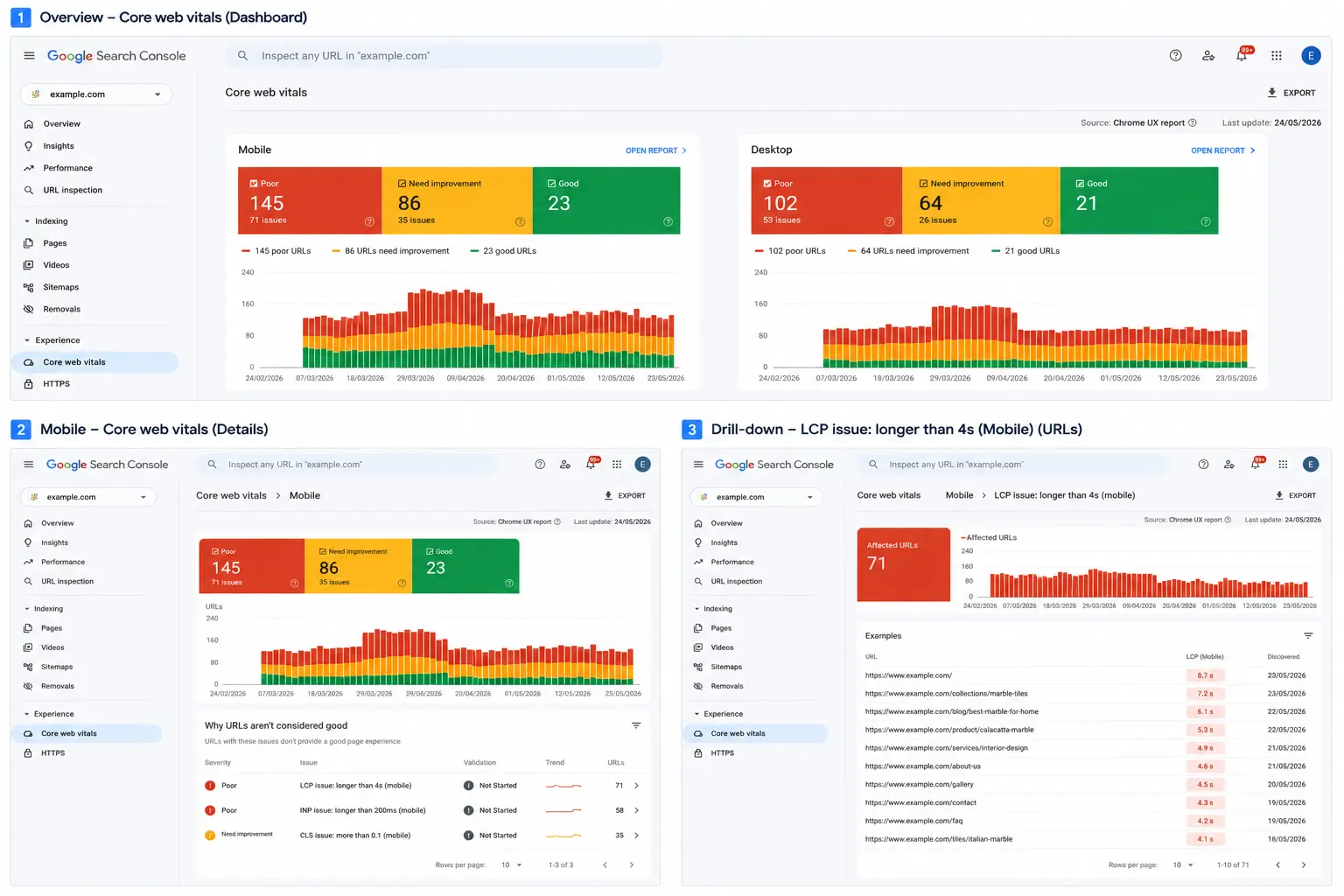
One of the biggest advantages of Search Console is that it helps identify site-wide Core Web Vitals issues affecting multiple pages at once. Since the data comes from real visitors, it gives a clearer picture of how users actually experience your website under real browsing conditions.
Google Search Console is best suited for:
- SEO professionals
- website owners
- agencies managing multiple pages
- long-term performance monitoring
PageSpeed Insights
Google PageSpeed Insights analyzes individual webpages using both real-user field data and simulated lab data. The tool measures important metrics such as LCP, INP, and CLS while also suggesting practical optimizations like image compression, caching improvements, script reduction, and code optimization.
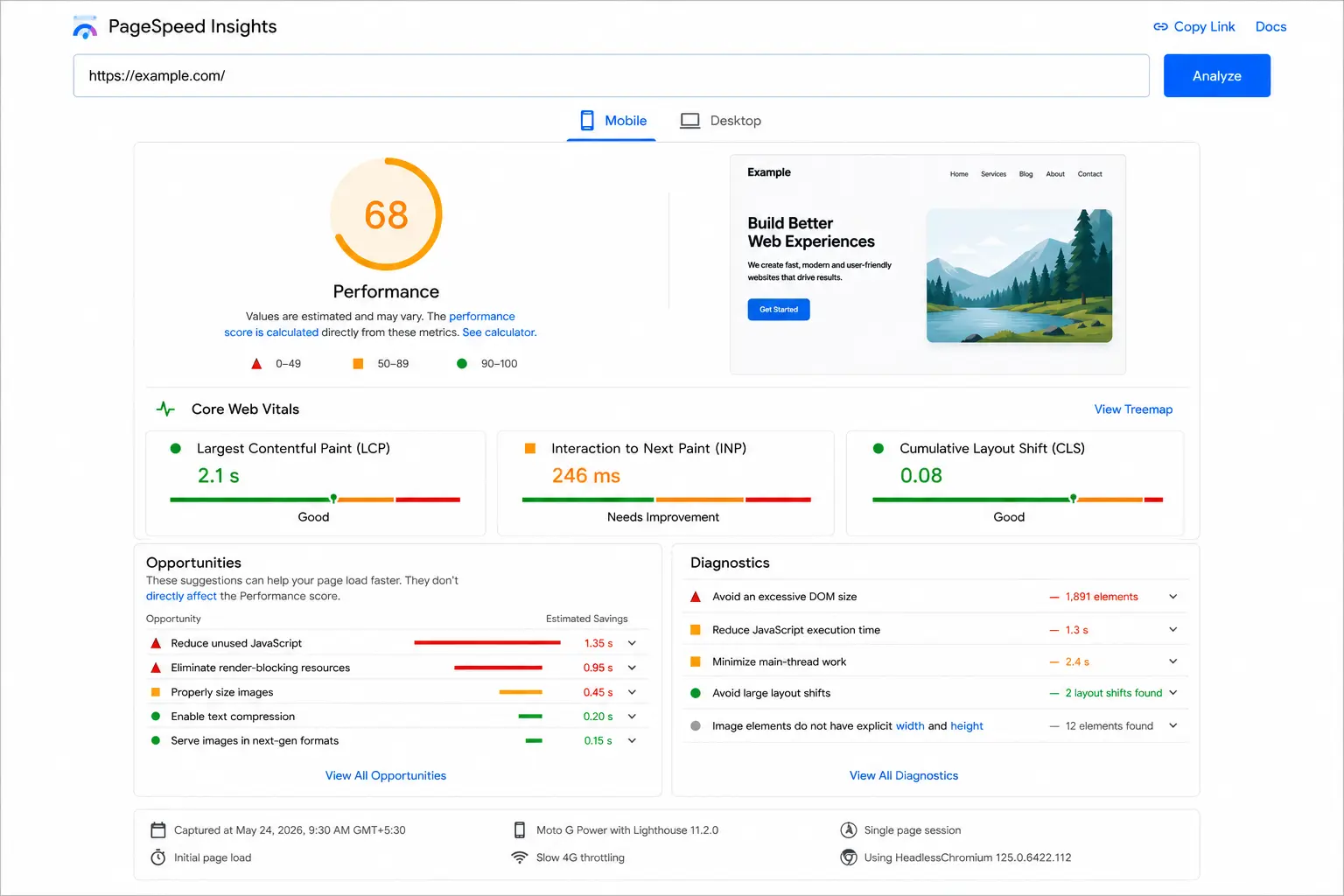
Unlike Search Console, which focuses on site-wide reporting, PageSpeed Insights is mainly used for testing specific URLs and identifying immediate performance bottlenecks.
This tool is especially useful for:
- marketers
- bloggers
- developers
- ecommerce websites
- small business owners
Chrome Lighthouse
Chrome Lighthouse Documentation is an automated auditing system built directly into Chrome DevTools. It generates detailed reports related to:
- performance
- accessibility
- SEO
- best practices
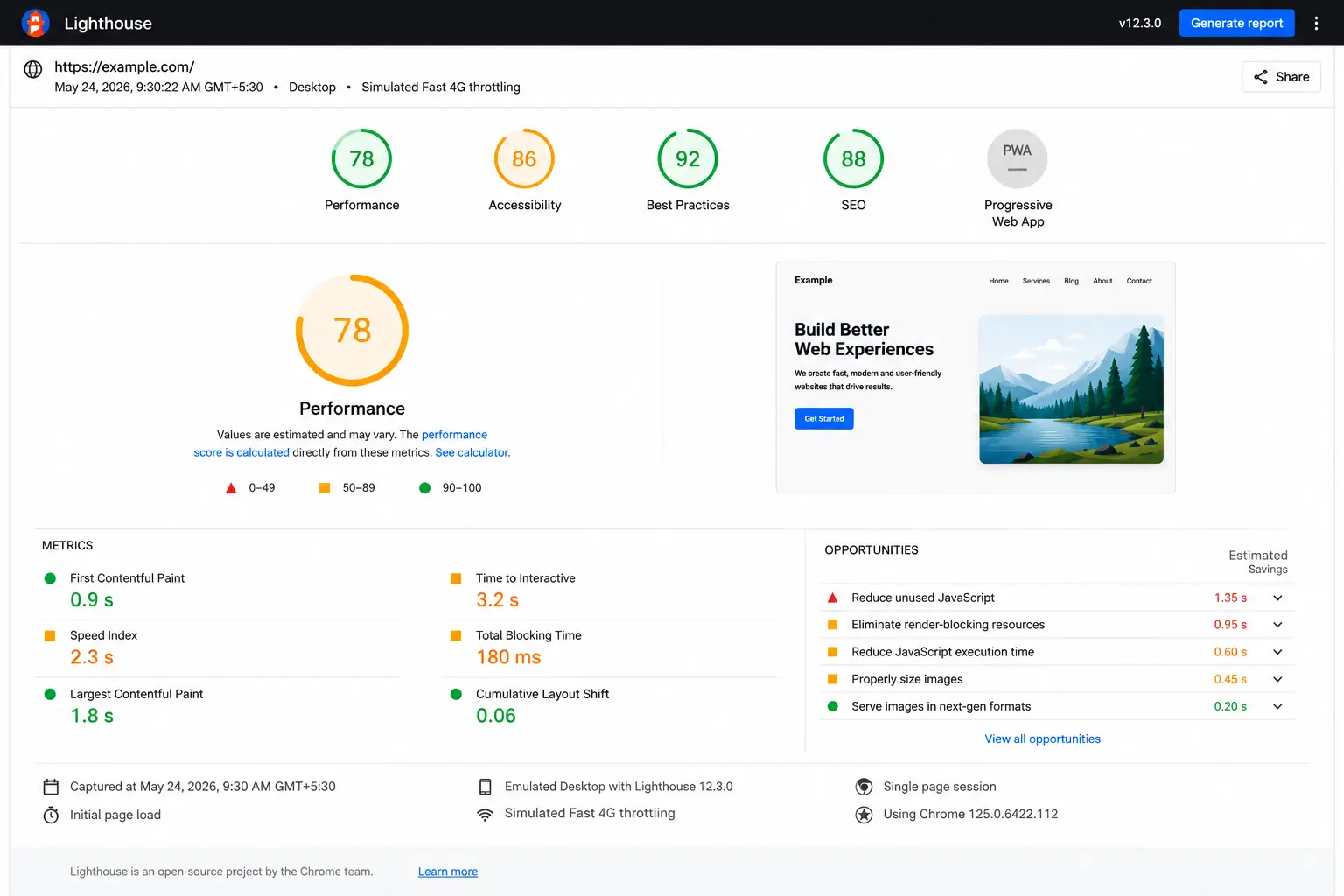
Unlike Google Search Console, Lighthouse does not use real-user browsing data. Instead, it performs tests inside a controlled lab environment, making it highly useful for debugging and pre-launch optimization.
Developers commonly use Lighthouse to:
- troubleshoot performance problems
- test staging environments
- identify render-blocking resources
- improve frontend optimization
Chrome DevTools (Inspect Element)
Another quick way to perform a basic Core Web Vitals check is through Chrome DevTools using the browser’s Inspect feature. Users can simply open a webpage in Google Chrome, right-click anywhere on the page, and select Inspect or press Ctrl + Shift + I (Windows) or Cmd + Option + I (Mac).
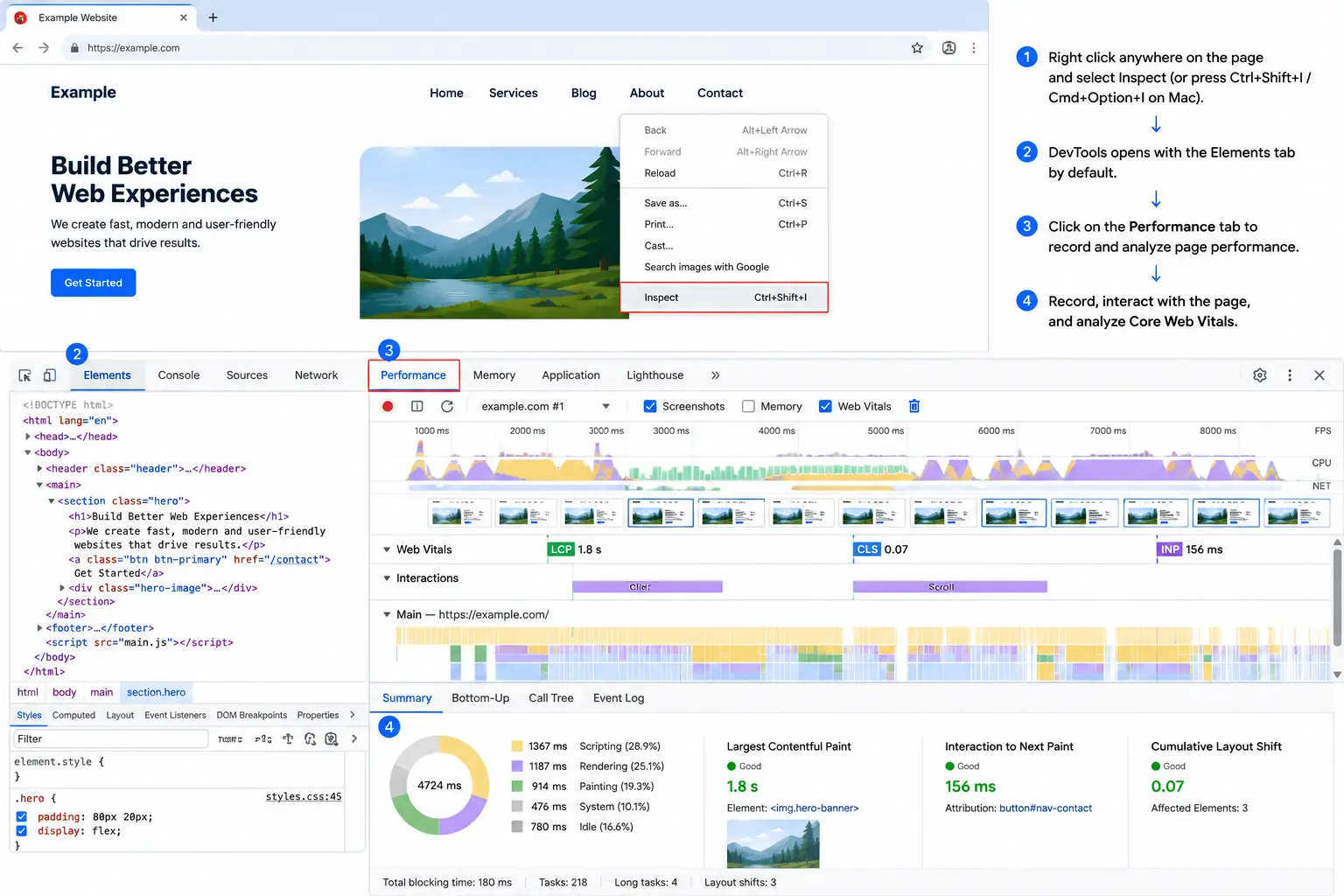
Inside DevTools, navigate to the Lighthouse or Performance tab to generate a performance report. Chrome will then analyze metrics like:
- LCP
- INP
- CLS
- accessibility
- page performance
This method is especially useful for developers and technical SEO teams who want to debug layout shifts, identify render-blocking resources, monitor JavaScript execution, and test performance changes instantly during development.
| Tool | Data Type | Best For | Ideal Users |
|---|---|---|---|
| Google Search Console | Real-user field data | Site-wide Core Web Vitals monitoring and affected URL tracking | SEO professionals, website owners, agencies |
| PageSpeed Insights | Field data + lab testing | Individual page testing, Core Web Vitals analysis, and optimization suggestions | Bloggers, marketers, developers, ecommerce websites |
| Chrome Lighthouse | Simulated lab testing | Technical debugging, frontend audits, and pre-launch optimization | Developers and technical SEO teams |
| Chrome DevTools (Inspect Element) | Real-time browser debugging + performance tracing | Analyzing layout shifts, JavaScript execution, rendering issues, and live Core Web Vitals debugging | Frontend developers, technical SEO experts, QA teams |
Recommended Workflow for Better Analysis
A practical workflow used by many SEO professionals and developers is:
- Identify performance issues inside Google Search Console
- Test affected pages individually using PageSpeed Insights
- Debug and optimize technical issues using Chrome Lighthouse
Using all three tools together provides a more accurate understanding of website performance, real-user experience, and Core Web Vitals SEO optimization opportunities.
How to Fix Core Web Vitals – Step-by-Step
Improving Core Web Vitals requires proper website performance optimization across loading speed, responsiveness, visual stability, server delivery, and mobile usability. While some improvements are content-related, most fixes involve frontend optimization, server performance, image handling, and JavaScript management. The goal is to make websites load faster, respond quicker, and remain visually stable for real users.
How to Fix LCP
Improving Largest Contentful Paint (LCP) mainly involves optimizing how quickly above-the-fold content becomes visible to users.
- Compress large hero images before uploading
- Use modern image formats like WebP or AVIF
- Preload important images, fonts, and critical resources
- Enable lazy loading for below-the-fold media
- Reduce server response time using caching and better hosting
- Remove render-blocking CSS and unnecessary JavaScript
- Minify CSS, JavaScript, and HTML files
- Reduce heavy third-party scripts such as chat widgets and trackers
- Use a CDN (Content Delivery Network) for faster global delivery
- Enable browser caching and Brotli/GZIP compression
High-impact LCP improvements usually come from image optimization, faster hosting, and reducing render-blocking resources.
How to Improve INP
Improving Interaction to Next Paint (INP) focuses on reducing delays between user actions and visible responses on the screen.
- Break large JavaScript tasks into smaller asynchronous functions
- Avoid bloated frontend libraries and unnecessary plugins
- Load non-essential scripts only after page interactivity
- Optimize click, scroll, form, and navigation event handling
- Reduce excessive DOM size and deeply nested elements
- Remove unused third-party tracking and analytics scripts
- Use web workers for background processing when needed
- Improve state management in React, Vue, or Angular applications
- Test responsiveness on lower-end mobile devices and slower networks
Reducing JavaScript execution time is often the biggest factor in improving INP performance.
How to Fix CLS
Improving Cumulative Layout Shift (CLS) requires keeping page elements visually stable during loading and interaction.
- Always define width and height attributes for images and videos
- Reserve dedicated space for ads, banners, and embedded content
- Avoid inserting dynamic content above visible page sections
- Optimize web font loading to prevent text shifting
- Limit intrusive popups and floating promotional bars
- Ensure sticky headers and cookie banners do not shift layouts
- Use CSS transform animations instead of layout-changing animations
- Place maps, iframes, and embeds inside predefined containers
- Test layout stability across multiple screen sizes and mobile devices
Unexpected layout movement is one of the fastest ways to frustrate users and reduce trust during browsing.
Core Web Vitals Assessment Failed? What to Do Next
If your Core Web Vitals assessment failed in Google Search Console, don’t panic – this is a very common issue, especially for growing websites with heavy media, third-party scripts, or outdated frontend optimization. A failed assessment simply means that real users experienced performance problems related to LCP, INP, or CLS during browsing. The good news is that most Core Web Vitals issues are measurable, fixable, and recoverable with the right optimization steps.
- Identify whether the issue is related to LCP, INP, or CLS
- Open Google Search Console’s Core Web Vitals report and check affected URLs and device types
- Test problematic pages individually using PageSpeed Insights
- Prioritize mobile fixes first since most traffic now comes from mobile devices
- Compress oversized images and reduce heavy media assets
- Remove unnecessary third-party scripts, plugins, and tracking tools
- After implementing fixes, request “Validate Fix” inside Google Search Console and wait for Google to refresh real-user field data
It’s important to remember that Core Web Vitals scores are based on real-user browsing behavior collected over time. Because of this, improvements may take several days or weeks before updated scores fully appear in reports.
Need Help Improving Your Core Web Vitals?
A professional technical SEO audit can help identify hidden performance issues affecting rankings, mobile usability, conversions, and user experience before they turn into larger business problems.
H2: Core Web Vitals & Website Development – Build It Right
Many Core Web Vitals problems actually begin during the website development stage – not after launch. Poor frontend architecture, oversized media files, bloated plugins, inefficient JavaScript, and lack of mobile-first optimization often create long-term performance issues that later affect rankings, user experience, and conversions.
That’s why modern website development is no longer only about attractive design. Today, websites must also be built with speed, responsiveness, scalability, and performance optimization in mind from day one. Clean code structure, lightweight frameworks, optimized assets, proper caching, and efficient rendering techniques naturally help websites perform better in Google Core Web Vitals assessments.
Fixing Core Web Vitals issues after launch is often more time-consuming and expensive than building a performance-first website initially. This is why businesses increasingly prefer development partners who understand both technical SEO and frontend performance optimization together.
Businesses today increasingly prefer working with a website development company that understands both technical SEO and performance optimization from the beginning. Modern websites should be built with mobile-first responsiveness, clean architecture, optimized assets, and Core Web Vitals best practices integrated during the development stage itself. This approach helps create faster, smoother digital experiences that support better usability, stronger engagement, and long-term search performance.
Core Web Vitals for SEO – The Bigger Picture
Core Web Vitals are important for SEO, but they are only one part of Google’s much larger ranking system.
They also play an increasingly important role in digital marketing for small businesses trying to improve online visibility, mobile user experience, and long-term organic growth.
Search engines still evaluate hundreds of signals, including content quality, search intent relevance, backlinks, website authority, mobile usability, and technical SEO performance. In most cases, Core Web Vitals work more like a competitive advantage or “tiebreaker” when multiple pages provide similar value to users.
For example, if two webpages answer the same search query equally well, the page offering a faster, smoother, and more stable browsing experience may gain an advantage in rankings. However, strong Core Web Vitals alone cannot help low-quality or irrelevant content rank well in search results.
This is why businesses should view Core Web Vitals as part of a broader SEO strategy rather than a standalone optimization tactic. Understanding the long-term benefits of SEO helps businesses see why website performance, technical optimization, and user experience all contribute to stronger organic growth.
Long-term SEO success usually comes from combining technical SEO, high-quality content, mobile-first design, user experience optimization, and conversion-focused website structure together.
Many businesses now work with a best digital marketing agency to improve not only Core Web Vitals performance but also overall visibility, engagement, and long-term organic growth.
Conclusion
Core Web Vitals have evolved from simple performance metrics into an important part of modern SEO and user experience strategy. Metrics like LCP, INP, and CLS help Google understand how fast, responsive, and visually stable a website feels for real users across mobile and desktop devices.
However, Core Web Vitals are not just about passing a ranking checklist. They directly influence how users interact with your website, how long they stay, and whether they trust your brand enough to convert. Faster loading pages, smoother interactions, and stable layouts often lead to lower bounce rates, stronger engagement, and better long-term SEO performance.
Businesses that focus on performance-first development, mobile optimization, technical SEO, and user experience together are far more likely to achieve sustainable organic growth in 2026 and beyond.
Need a Faster, SEO-Friendly Website?
Build a website that delivers better performance, smoother user experience, and stronger search visibility from the start. Optimize speed, usability, and Core Web Vitals to create a website that both users and search engines prefer.
FAQ’s
Core Web Vitals are the tools created by Google that measure the user experience on a website. In particular, Core Web Vitals assess page loading speed, interactive capabilities, and visual stability during navigation on a website. These criteria help Google recognize websites that offer smooth browsing and pleasant user experience.
A positive evaluation of Core Web Vitals means that a website successfully passes the test based on the thresholds set up by Google in terms of LCP, INP, and CLS. On average, it is recommended that the loading time be less than 2.5 seconds, interaction be less than 200 milliseconds, and CLS be less than 0.1.
You may use one of the following tools to test Core Web Vitals of your site – Google Search Console, PageSpeed Insights, and Lighthouse from Chrome. Such services will detect any problems concerning loading, responsiveness, and visual stability and also recommend certain fixes.
Being listed as a website with low Core Web Vitals scores simply implies that Google found poor real user experience metrics when analyzing your site’s pages. While this doesn’t instantly drop you from the ranks, it weakens user experience signals and impacts the performance of your website.
The duration of resolving Core Web Vitals issues will depend on how significant the performance issue is as well as the structure of the website itself. While minor fixes might be visible in a few days, other development issues may require several weeks. Google needs to gather additional real user data before refreshing the results.
First Input Delay only measured the amount of time users waited during their first interaction with the webpage. INP is a new signal measuring responsiveness during an entire browsing session.
Yes, the importance of mobile Core Web Vitals is generally higher since most searches take place through smartphones. Mobile devices also suffer from slow internet connectivity, small screen size, and increased interaction sensitivity. A site that performs well on the desktop but does not perform well on the mobile could still face challenges during its search engine ranking and popularity.
Visual Stability Index (VSI) is a new performance indicator that enhances CLS by measuring layout stability throughout the browsing session. In contrast to CLS, it takes into account the user’s intent and overlooks any expected layout change due to interaction by the user. Any unexpected layout change due to ads or pop-ups would remain unfavorable.
9. Are Core Web Vitals better than SEO?
No, Core Web Vitals are not better than SEO — they are simply one important part of modern SEO. They help Google measure user experience based on speed, responsiveness, and visual stability, while SEO also includes content quality, backlinks, search intent, and technical optimization.