

Table of Contents
- 1.What Are Server-First Architecture and Edge Deployments?
- 2.How Does Server-First Architecture Work?
- 3.Server-First vs Client-Side Rendering: What Is the Difference?
- 4.What Are the Benefits of Edge Deployments?
- 5.How Do Server-First Architecture and Edge Deployments Improve SEO?
- 6.How Does Server-First Architecture Improve Security?
- 7.What Are the Challenges of Server-First and Edge Architecture?
- 8.Where Do Server-First and Edge Deployments Work Best?
- 9.How to Implement Server-First Architecture and Edge Deployments
- 10.Server-First & Edge Deployment Checklist
- 11.Conclusion
- 12.Frequently Asked Questions
Why does your site still feel slow, even after a redesign? Usually it’s because the browser is doing work it was never meant to do. Server-first architecture and edge deployments fix that by moving rendering and logic off the visitor’s device and onto infrastructure you actually control: the server and a network of edge nodes close to where your users are.
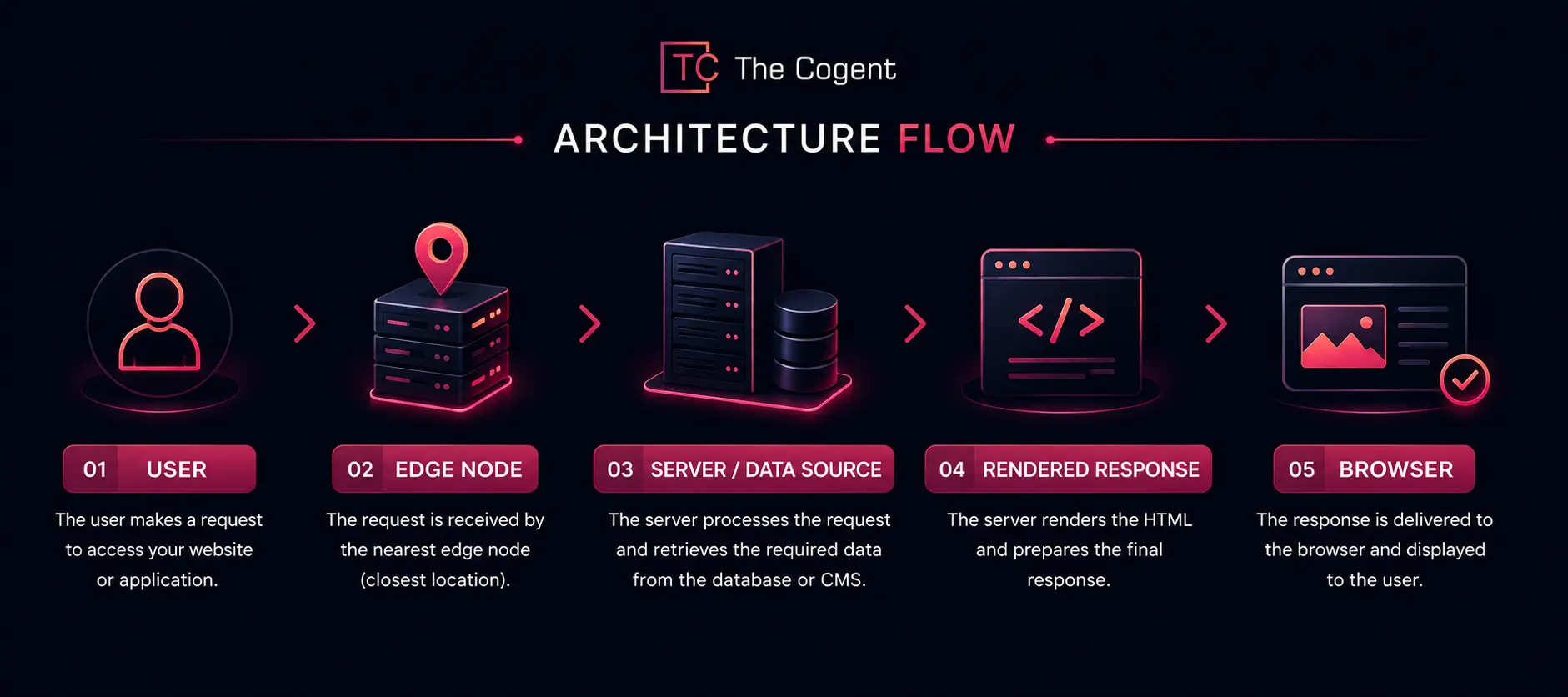
Instead of sending down a pile of JavaScript and hoping the phone or laptop can assemble the page fast enough, server-first architecture builds the page ahead of time.
Edge deployments then get that finished page to the user from somewhere nearby, not from a data center halfway across the world. The payoff shows up in load times, in Core Web Vitals scores, and eventually in rankings too. If your site’s been stuck in the same spot on Google for months, it’s worth getting the best digital marketing company in Jaipur to look at the technicalities.
What Are Server-First Architecture and Edge Deployments?
For years, websites let the browser do most of the work. Load the page, then let JavaScript handle the rest. That model is breaking down fast, mostly because users won’t wait around anymore. Server-first architecture and edge deployments pull that work back onto infrastructure the developer controls.
Server-Side Rendering
The basic idea is that the server puts together the HTML first, before anything reaches the browser. So the visitor sees something on screen right away, instead of staring at a blank page while scripts load.
Server Components
Server components do the data fetching and the logic server-side, and only send the browser what it actually needs to display.
Edge Deployments & Distributed Network Nodes
This is where edge deployments come in; they run on nodes scattered across the globe rather than one central server in a single city. A shopper in Mumbai and one in Berlin both get served from somewhere nearby, not from the same faraway box.
Reduced Client-Side JavaScript
Less logic on the browser side means less client-side JavaScript to pull down, unpack, and run. Older phones and shaky connections notice the difference immediately.
For businesses building or rebuilding a site, working with an established website development company makes this transition far smoother.
How Does Server-First Architecture Work?
If you break it down, it’s not very complicated. A number of moving parts, each doing one job well.
Rendering & Application Logic Move to the Server
The server assembles the page instead of the browser. Fewer round trips, less guesswork happening on the visitor’s device.
Reduced Client Payloads Improve Browser Performance
Smaller payloads parse faster. Older phones and shaky mobile data stop being the bottleneck they used to be.
Streaming SSR Delivers Content Faster
Streaming SSR doesn’t wait for the whole page to be ready; it sends chunks of HTML as soon as they’re done. Visitors start seeing something sooner rather than waiting.
Partial Hydration Keeps Pages Interactive
Only the parts that actually need interactivity get hydrated with JavaScript. Everything else stays static, which saves processing time nobody notices until it’s gone.
All of this feeds into website user experience and SEO; pages that feel smoother tend to keep people around longer, and that matters more than most site owners realize.
Server-First vs Client-Side Rendering: What Is the Difference?
This isn’t just a technical preference buried in a developer meeting. It changes how fast your site feels in someone’s hand, and how easily Google can actually read it.
Server-First Rendering
Content shows up already built. The browser isn’t doing assembly work on the fly.
Client-Side Rendering
The browser has to download JavaScript first, then build the page from scratch. On a weak connection, that first load can be slow.
Hybrid Rendering
A lot of real-world sites fall somewhere in between: hybrid rendering, where the shell is server-first, and a handful of widgets stay client-side.
Here’s how server-first vs client-side rendering compares on the factors that matter most:
|
Factor |
Server-First |
Client-Side Rendering |
| Rendering | Server/Edge | Browser |
| JavaScript Payload | Lower | Higher |
| Initial HTML | Available Earlier | Often JS Dependent |
| Browser Processing | Lower | Higher |
| SEO & Crawling | Easier Content Access | May Require JS Rendering |
What Are the Benefits of Edge Deployments?
It’s easy to write off “edge” as another buzzword marketers use. But the problems it solves are real, and they show up in numbers you can actually measure.
Low Latency
Distributed edge nodes are physically close to users, so requests don’t have to travel as far. Low latency stops being something you hope for and starts being the default.
Instant & Distributed Scaling
A sudden traffic spike doesn’t crush one overworked server anymore; it gets spread across a whole CDN edge network instead.
Localized Logic & Personalization
Localized logic means edge functions can apply region-specific rules right at the point closest to the user.
Distributed Caching
Distributed caching keeps frequently requested content near the visitor. So, repeat visits load a lot faster.
Common real-world uses include:
- Authentication checks at the edge
- A/B testing without extra round trips
- Location-based content delivery
- Regional personalization for pricing or language
How Do Server-First Architecture and Edge Deployments Improve SEO?
Google rewards speed; it rewards clarity even more. Server-first architecture and edge deployments hit both marks at once, which is why so many technical SEO audits now flag rendering strategy as the first thing to fix.
Better Search Engine Crawling & Indexing
Pre-rendered HTML is just easier for crawlers to chew through than a JavaScript-heavy page that needs extra processing before it makes sense.
Reduced JavaScript Processing
Less client-side JavaScript means fewer delays while crawlers try to render the page properly.
Faster Time to First Byte
Edge rendering shrinks the distance data has to travel, which reduces a good chunk of time to first byte.
Better Core Web Vitals & Page Experience
Faster loads, less layout jumping around, both feed straight into Core Web Vitals scores, and Google factors those into how pages rank.
A quick look at how each piece contributes:
|
Improvement |
SEO/Performance Impact |
| Server-Side Rendering | Easier HTML Access |
| Reduced JavaScript | Lower Browser Workload |
| Edge Rendering | Lower Latency |
| Distributed Caching | Faster Content Delivery |
And this loops right back into website structure and Google rankings; crawlability and raw speed aren’t separate conversations anymore.
How Does Server-First Architecture Improve Security?
Speed gets all the attention, but there’s a security angle here too, and it’s worth just as much thought.
API Keys & Tokens Stay Away From the Browser
Credentials never touch client-side code, which means nobody can just pop open dev tools and grab them.
Database Queries Remain Server-Side
Queries run right where the database is, not exposed in a script anyone could inspect.
Sensitive Application Logic Is Less Exposed
Business rules stay out of view, which cuts down the risk of someone reverse-engineering how your app actually works.
What Are the Challenges of Server-First and Edge Architecture?
None of this comes easy, and it’s worth being upfront about that. Teams moving to this model run into a few recurring challenges.
Cold Starts
An edge function that hasn’t run in a while can take a beat to spin up. Small delay, but noticeable if you’re chasing every millisecond.
Distributed State Management
Keeping state consistent across a dozen different nodes takes real planning; it’s not something you bolt on afterwards.
Debugging Complexity Across Edge Nodes
The same error can show up differently depending on which region triggered it, which makes tracing bugs a lot messier than on a single server.
Server & Edge Infrastructure Complexity
More pieces in play means more configuration, more monitoring, more things that can quietly break.
|
Challenge |
Impact |
Recommended Approach |
| Cold Starts | Slower first response | Keep functions warm, use lightweight runtimes |
| Distributed State | Sync issues | Centralize state where possible, use edge-aware stores |
| Debugging | Harder to trace errors | Use unified logging across nodes |
| Infrastructure Complexity | Higher maintenance | Rely on managed edge platforms |
Where Do Server-First and Edge Deployments Work Best?
Not every site needs to go all-in on this. But a few categories lean on edge computing for web applications more than others.
E-commerce Websites
Product pages that load fast and pricing that adjusts by region both hit conversions directly.
SaaS & Web Applications
Users are scattered across time zones and continents, and they all expect the same snappy performance.
Content & Publishing Websites
Articles that load quickly keep readers around longer, and crawlers move through them faster too.
AI-Powered Applications
Real-time responses live or die on how little latency is between the user and the server.
How to Implement Server-First Architecture and Edge Deployments
It’s a process, and it starts with actually being honest about what your site needs.
Decide What Should Run on the Server
Anything data-heavy or sensitive belongs there, not out in the browser where it’s exposed.
Decide What Should Run at the Edge
Caching, personalization, geo-specific rules- these are essentials for edge-first architecture.
Keep Necessary Interactivity in the Browser
Not everything moves server-side. Forms, animations, and interactive elements still need to run in the browser.
Use Server Components, SSR & Edge Runtimes
Tools like React Server Components, Next.js, streaming SSR, edge runtimes, and CDN infrastructure are what make server-first web development workable at scale, not just theoretical.
Test Performance Before & After Deployment
Run Google PageSpeed Insights and Lighthouse before you touch anything, then again after. Numbers will tell you if the change actually did anything.
Working with an experienced website development company helps sidestep the expensive mistakes here, especially when you’re also trying to keep up with website design trends.
Server-First & Edge Deployment Checklist
- Server-Side Rendering Reviewed
- Server Components Evaluated
- Client JavaScript Reduced
- Edge Nodes Configured
- Distributed Caching Implemented
- State Management Reviewed
- Cold Starts Monitored
- Sensitive Logic Kept Server-Side
- Core Web Vitals Tested
- Crawlability & Indexing Checked
- Global Performance Tested
Conclusion
Server-first architecture and edge deployments aren’t some passing trend developers will forget about in a year. They’re quickly becoming the standard for how proper websites get built. The server handles rendering, data, and anything sensitive. The edge handles caching, low latency, and logic that needs to feel local. The browser is left with just the interactivity that genuinely needs to live there. Put together, these three layers cut load times, tighten up security, and hand search engines cleaner content to work with.
If nobody’s checked your site against this standard yet, that’s probably worth fixing. Request a professional website and technical SEO audit from The Cogent, and find out exactly where the gaps are and what it’ll take to close them.
Frequently Asked Questions
It’s an approach where rendering and application logic happen primarily on the server rather than the browser.
Edge deployments run code on distributed nodes close to users instead of one central server, cutting latency.
It shifts rendering, data fetching, and logic to the server. It sends finished HTML to the browser instead of raw scripts.
They are components that fetch data and run logic server-side. They then deliver only the necessary markup to the client.
Server-first renders content before it reaches the browser. Client-side rendering builds the page after JavaScript loads.
By processing requests at nodes physically closer to the user, cutting the distance data has to travel.
Yes. It gives search engines ready-made HTML, making crawling and indexing more reliable.
Lower latency, better scaling, localized personalization, and faster caching are the main gains.
Cold starts, distributed state management, and added infrastructure complexity are the most common hurdles.
Most benefit from some hybrid version. The right mix depends on traffic patterns, interactivity needs, and budget.