Crawled – Currently Not Indexed: Why Google Skips Your Page and How to Fix It

“Crawled – currently not indexed” means Google has visited and read your page but decided, for now, not to add it to the search index. It is not a penalty. Common causes include thin or duplicate content, poor internal linking, a misdirected canonical tag, a mismatch between the page and actual search intent, or a site that hasn’t yet earned enough authority for Google to index everything it finds. The fix is almost always to strengthen the page itself and its position within the site.
TL;DR
“Crawled – Currently Not Indexed” means Google has successfully crawled and evaluated your page. But it has decided not to include it in its search index for now. It is not a penalty or necessarily a technical error. Common reasons include:
- Thin or duplicate content
- Weak internal linking
- Incorrect canonical tags
- Poor search-intent alignment
Not every page needs fixing. If the page is useful, unique and properly linked, Google may index it naturally over time. Request Indexing should be the final step, not the first.
Why Would Google Crawl a Page and Then Refuse to Index It?
This is one of the more counterintuitive statuses a site owner can encounter in Search Console, largely because it implies that Google did its job: it found the page, retrieved it, and rendered it, yet still declined to store it in the index. In plain terms, Googlebot judged the page and decided it wasn’t worth including, at least not yet. This is a quality or relevance decision, not a technical error, and it is rarely permanent.
A technical SEO audit checklist can help separate genuine technical problems from cases where Google simply needs stronger quality, relevance, or site-level signals. The remainder of this article sets out precisely why this happens, what an SEO professional would actually check first, and when the correct response is simply to leave the page alone.
Edge cases
Pagination pages
URLs like /blog/page/2/ often show up here. Google doesn’t need them indexed, because the posts they list are indexed on their own. Leave them.
RSS and feed URLs
/feed/ and /comments/feed/ get crawled but aren’t meant for search. Ignore them.
Parameter and tracking URLs
URLs with ?utm_source= or ?replytocom= are duplicates of a page that’s already indexed. Make sure each has a canonical to the clean URL.
Image files such as WebP
A standalone .webp or .jpg URL can appear in the report when something links to it directly. It’s a file, not a page, and it doesn’t need indexing. Your images can still appear in Google Images through the pages that use them.
False positives
The report updates slowly. A URL can show as not indexed in the report while URL Inspection says it’s indexed. Always trust the live inspection over the report.
Pages you shouldn’t index at all
Thank-you pages, internal search results, login pages and tag archives with one post. Their absence is usually fine.
What “Crawled – Currently Not Indexed” Means in Search Console
When this label appears against a URL in the Page indexing report, it confirms that Googlebot accessed the page successfully, read its content, and rendered it much as a browser would. What did not happen is the final step: inclusion in the index that powers search results.
Google has already evaluated a crawled-but-unindexed page, so the fix has to address whatever caused it to pass on the page. Pages that are only “Discovered” need a different approach, which the comparison table below explains.
Crawling and Indexing Operate as Two Separate Decisions
It is worth being precise about terminology here, because the two terms get used interchangeably in casual conversation, and that imprecision causes confusion when diagnosing the issue. Understanding Robots.txt vs Noindex is also important because they affect crawling and indexing in fundamentally different ways.
- Crawling refers to Googlebot’s act of visiting a URL and retrieving its content.
- Indexing is an entirely separate, subsequent decision about whether that content earns a place in the searchable database Google draws from when serving results.
A page can clear the first hurdle without clearing the second. A product listing that loads correctly but duplicates content already indexed elsewhere on the same domain is a textbook example: Google will happily crawl it repeatedly, yet see little reason to store what is, in effect, a second copy of something it already has.
Crawled vs Discovered: How to Tell Which One You Have
The two labels sit in the same report, so they get mixed up. The quickest way to separate them is to ask whether Google has actually visited the URL.
| Status | What Google did | Where the problem usually sits | What to look at first |
|---|---|---|---|
| Crawled – currently not indexed | Visited the page and read it, then chose not to index it | The page: content, duplicates, canonical | Content depth, similar pages on your site, canonical tag |
| Discovered – currently not indexed | Found the URL but hasn’t visited it yet | The site: crawl priority, internal links, server speed | Internal links, sitemap, how many low-value URLs you have |
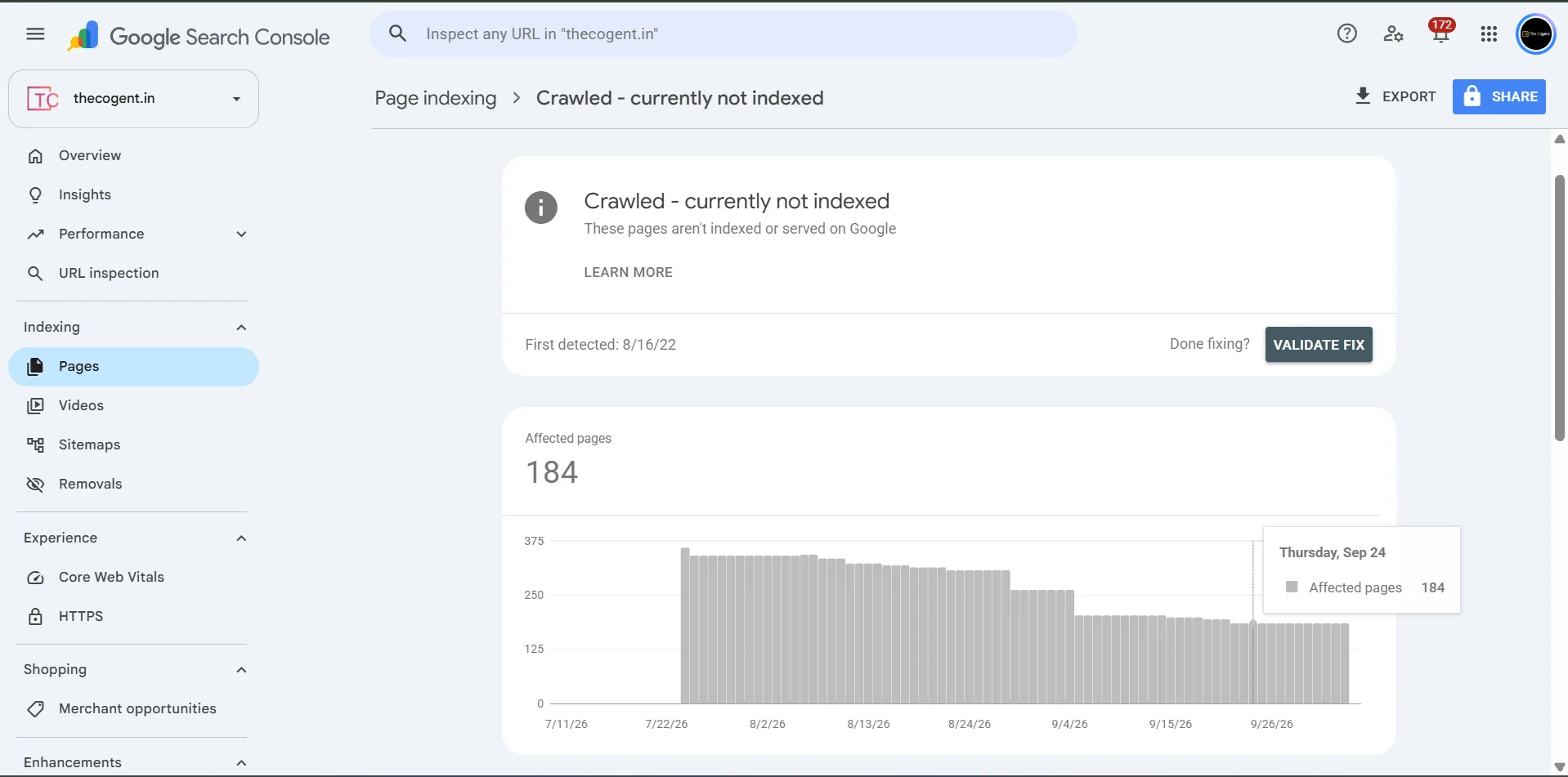
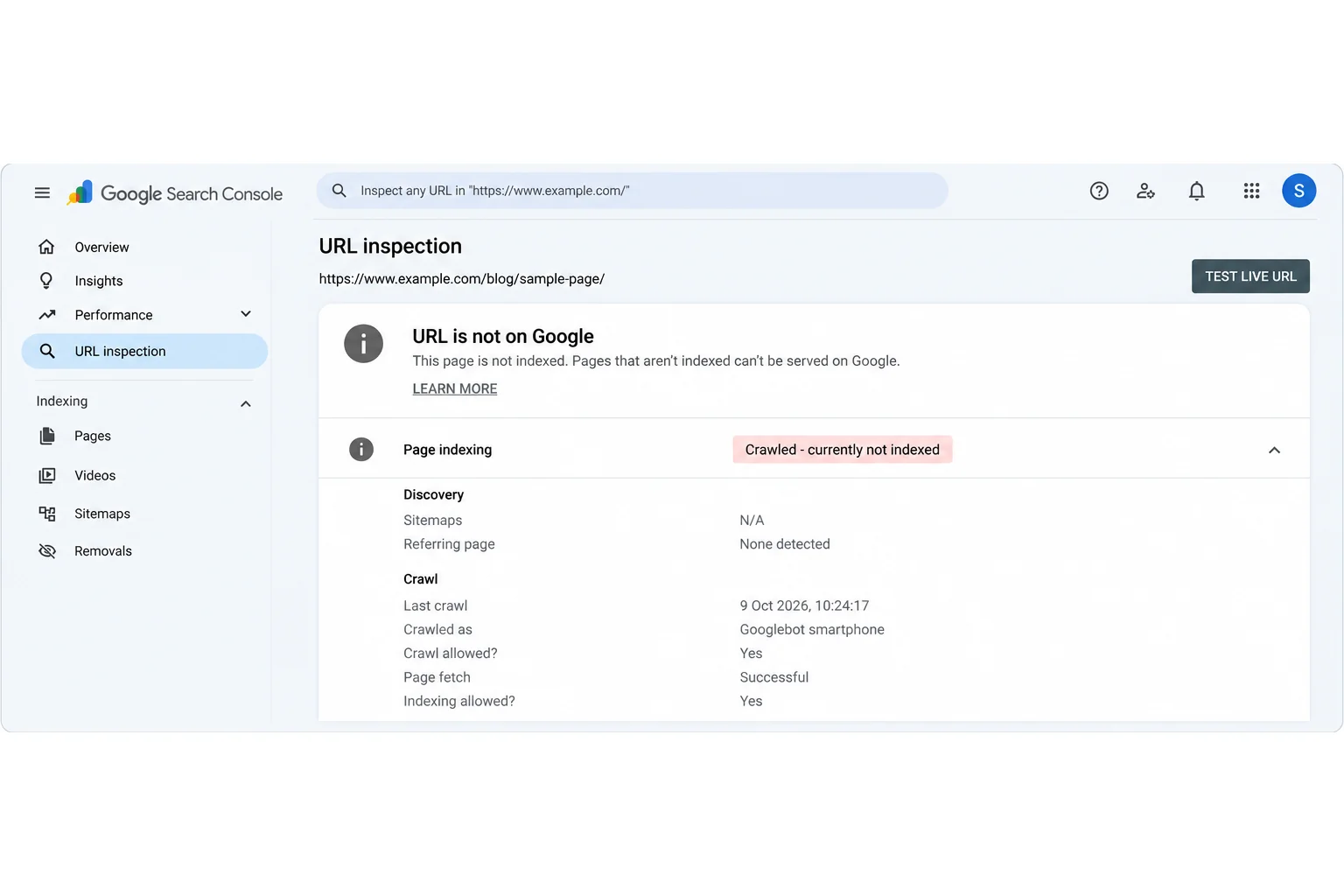
To check, open Search Console, go to Pages, and click the status. Then paste one affected URL into the URL Inspection tool. If “Last crawl” shows a date, you’re dealing with Crawled. If it says “N/A”, it’s Discovered.
Why Google Crawls a Page But Declines to Index It
In professional practice, this status is rarely traced to a single cause. More often, two or three factors compound one another, and untangling which one is dominant is the real diagnostic work.
Thin or low-value content
This remains the most frequent explanation. A page with sparse, generic text that doesn’t meaningfully answer the query it targets simply fails to clear the bar Google sets for inclusion. Nothing needs to be technically broken for this to happen; the content itself is the obstacle.
Duplicate or near-duplicate content elsewhere on the site
Sites with multiple location pages, tag archives, or near-identical product variants frequently run into this. Google tends to index one representative version and leave close duplicates crawled but excluded, not as a punishment, but as a practical way of avoiding redundant entries in its results.
A mismatch between the page and genuine search intent
A page can be competently written and still be passed over if it does not match what a searcher actually wants from that query. If the target term implies, for instance, a comparison or buying guide, but the page in question is a corporate announcement, Google may register the mismatch and decline to index it regardless of writing quality.
Weak or absent internal linking
Pages that receive few or no internal links send an implicit signal, even to Google, that the site itself does not consider them a priority. Orphaned pages, or pages buried several clicks from the homepage, are disproportionately represented in this status.
A canonical tag pointing to a different URL
At times, the page’s canonical tag will name another URL as the preferred version. Google will respect that instruction and will not index the current page. This will be done even when this outcome was unintended.
Limited site authority and crawl budget
On newer or lower-authority domains, Google is understandably more selective about what it commits to indexing. Content that would be indexed without hesitation on an established domain can be passed over simply because the site as a whole has not yet accumulated sufficient trust, while a poorly organised website structure can make important pages harder for Google to discover, understand, and prioritise.
How to Fix “Crawled – Currently Not Indexed”
Work through these in order. The early steps take minutes and rule out the easy causes. The later ones need real work on the page, so don’t skip ahead to Request Indexing.
Pre-Fix Audit Checklist
Before you change anything, answer these five questions for the affected page:
- Does the page offer something meaningfully distinct from similar pages already on the site?
- Is it linked to from at least a handful of relevant, already-indexed pages?
- Does the canonical tag correctly self-reference, or point elsewhere only by deliberate choice?
- Does the content genuinely match what a searcher using the target term is looking for?
- Is the page correctly included in the current XML sitemap?
The Fix Order
- Confirm the status. Test the live URL in URL Inspection. If it shows as indexed, stop here. The report was out of date.
- Fix the technical mismatches from your audit. That means a wrong canonical, a missing sitemap entry, or an accidental noindex. These are quick wins.
- Check for duplicates. Search
site:yourdomain.com "a distinctive sentence from the page". If another page of yours covers the same ground, merge them or differentiate this one. - Add internal links. Link to the page from 2–3 relevant pages that are already indexed, using descriptive anchor text.
- Rework the content. Compare the page with what’s ranking for the query. Add what’s missing: first-hand detail, a real example, a screenshot, a clearer answer near the top.
- Resubmit the sitemap, then request indexing once. Do this after steps 1–5, not before.
- Wait 2–4 weeks, then re-check. If the status hasn’t changed, return to step 5. The cause is almost always the content, not the settings.
What Not to Do
- Don’t click Request Indexing every day. It doesn’t speed up Google’s decision.
- Don’t delete and republish the page or change its URL. You lose its history and gain nothing.
- Don’t add noindex just to clear the report.
- Don’t pay for links to force indexing.
- Don’t mass-delete pages before checking which ones bring traffic.
When the Correct Response Is to Leave the Page Alone
Not every case demands active intervention. New pages, lower-priority pages, or pages on sites that publish frequently can sit in this status temporarily and resolve on their own as Google reassesses the site over time. Where a page is genuinely useful, reasonably well-linked, and not duplicating existing content, the more sensible course is often patience rather than repeated use of Request Indexing, which does not accelerate the underlying evaluation and can, if overused, draw crawl attention away from other pages that need it.
Sites that repeatedly encounter this status across multiple pages are often dealing with a structural or content-quality issue that isn’t visible from the Page indexing report alone. The Cogent provides a comprehensive website and technical SEO audit that identifies exactly why Google is declining to index specific pages, examining crawl budget allocation, internal linking architecture, canonicalization, and content quality, and delivers a prioritized action plan rather than a list of guesses. Request an audit from the best digital marketing agency in Jaipur to get a clear diagnosis for your site.
Frequently Asked Questions
With “Crawled”, Google visited the page, read it and chose not to index it, so the problem is usually the page itself. With “Discovered”, Google knows the URL exists but hasn’t visited it yet. That points to crawl priority or site signals, not content.
Not directly. It affects the visibility of that individual page rather than the site’s rankings elsewhere, though a large volume of pages sitting in this status is often a useful signal of a broader content or site-structure issue worth investigating.
There is no fixed timeframe. Some pages are reindexed within days of a fix being applied; others, particularly on newer or lower-authority sites, can take several weeks.
No. It only asks Google to recrawl sooner. Request it once, after you’ve fixed something real. If the cause hasn’t been resolved, the page will likely return to the same status, and repeated requests won’t change that.
A canonical pointing to another URL can. Noindex normally shows as “Excluded by noindex tag”, and robots.txt blocks show as “Blocked by robots.txt”, so those are separate statuses. Still, check all three, because a messy setup can confuse the report.
It isn’t always a problem. Pagination pages, feeds, tag archives and parameter URLs often land here, and Google is right to skip them. Worry about it when the URL is one you want to rank, like a service page or a blog post.
Yes. A page with no internal links, or only one from a footer or sitemap, tells Google it isn’t important. Link to it from 2–3 relevant pages with descriptive anchor text, ideally pages that are already indexed and getting traffic.