
Table of Contents
- 1.Robots.txt vs Noindex: What Is the Key Difference?
- 2.When Should You Use Robots.txt?
- 3.When Should You Use a Noindex Tag?
- 4.Should You Use Robots.txt or Noindex?
- 5.Does Robots.txt Prevent Indexing?
- 6.Can You Use Robots.txt and Noindex Together?
- 7.Common Robots.txt and Noindex Mistakes to Avoid
- 8.How to Check Whether Robots.txt and Noindex Are Working Correctly
- 9.Why Choose The Cogent for Technical SEO?
- 10.Conclusion
- 11.Frequently Asked Questions
Robots.txt or noindex: Which one actually keeps a page out of Google? The honest answer is that they do two different jobs, and mixing them up is one of the most common technical SEO mistakes site owners make. Robots.txt controls whether Googlebot can crawl a URL in the first place, while a noindex tag controls whether a URL that’s already been crawled stays out of search results.
In a robots.txt vs noindex comparison, the real distinction comes down to crawling versus indexing, two separate stages Google works through before a page ever shows up in results. Getting this wrong can quietly cause a website traffic drop that’s hard to trace back to its source. This guide breaks down when to use each one, and where teams typically go wrong. For a deeper technical review, the best digital marketing agency in Jaipur can walk through your site’s setup directly.
Robots.txt vs Noindex: What Is the Key Difference?
Robots.txt manages crawl access, while noindex manages search visibility, and that single distinction explains almost every mistake made around these two tools. Before comparing them side by side, it helps to understand what each one is actually built to do.
Crawling is Googlebot visiting a page to read its content. Indexing is Google deciding whether to store that page and show it in search results. Robots.txt stays at the crawling stage; noindex falls at the indexing stage, and confusing the two leads to some genuinely avoidable problems.
|
Factor |
Robots.txt |
Noindex |
| Main Purpose | Control crawling | Control indexing |
| Implementation | robots.txt file | Meta tag / HTTP header |
| Stops Crawling | Yes | No |
| Prevents Search Appearance | Not reliably | Yes, once processed |
| Google Needs to Crawl to Process It | No | Yes |
| Typical Use | Crawl management | Search-result exclusion |
According to Google Search Central’s official robots.txt documentation, a Disallow directive tells crawlers not to request certain URLs; it does not guarantee those URLs stay out of search results.
When Should You Use Robots.txt?
Robots.txt makes sense when you want to stop search engine crawlers from wasting time or resources on parts of a site that don’t need attention. It’s a crawl-management tool, not a search-visibility tool, and treating it as one leads directly to the mistakes covered further down.
Common Situations Where Robots.txt Is Appropriate
Internal search result pages, staging environments, admin folders, and large sets of low-value URLs are typical candidates. These are usually pages nobody wants Googlebot spending crawl budget on, but they aren’t necessarily pages that need to be pulled from search results specifically.
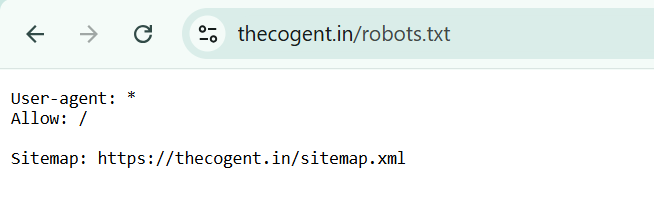
Robots.txt Disallow Example
A simple Disallow directive in the robots.txt file, pointed at a folder like /admin/ or /search/, tells crawlers to skip requesting those URLs. It’s a blunt instrument by design; it blocks crawl access, nothing more.
A common use of the robots.txt file is to stop search engine crawlers from accessing certain directories on a website. For instance, if your server contains a “/cgi-bin/” directory that does not contain content relevant to search engines, you can use robots.txt to prevent it from being crawled.
On a WordPress website, the robots.txt file typically appears as follows:
User-agent: *
Disallow: /wp-admin/
Allow: /wp-admin/admin-ajax.php
When Should You Use a Noindex Tag?
A noindex tag is the right tool when a page needs to stay out of search results specifically, regardless of whether Google crawls it. This is the more precise option when search visibility, not crawl access, is the actual concern.
Common Pages Where Noindex Is Appropriate
Thank-you pages, internal search results, and selected low-value or duplicate URLs where noindex is the appropriate indexing strategy are common candidates. These pages often still need to be crawlable, for internal linking or functionality, but shouldn’t appear in search results.
Meta Robots Noindex Example
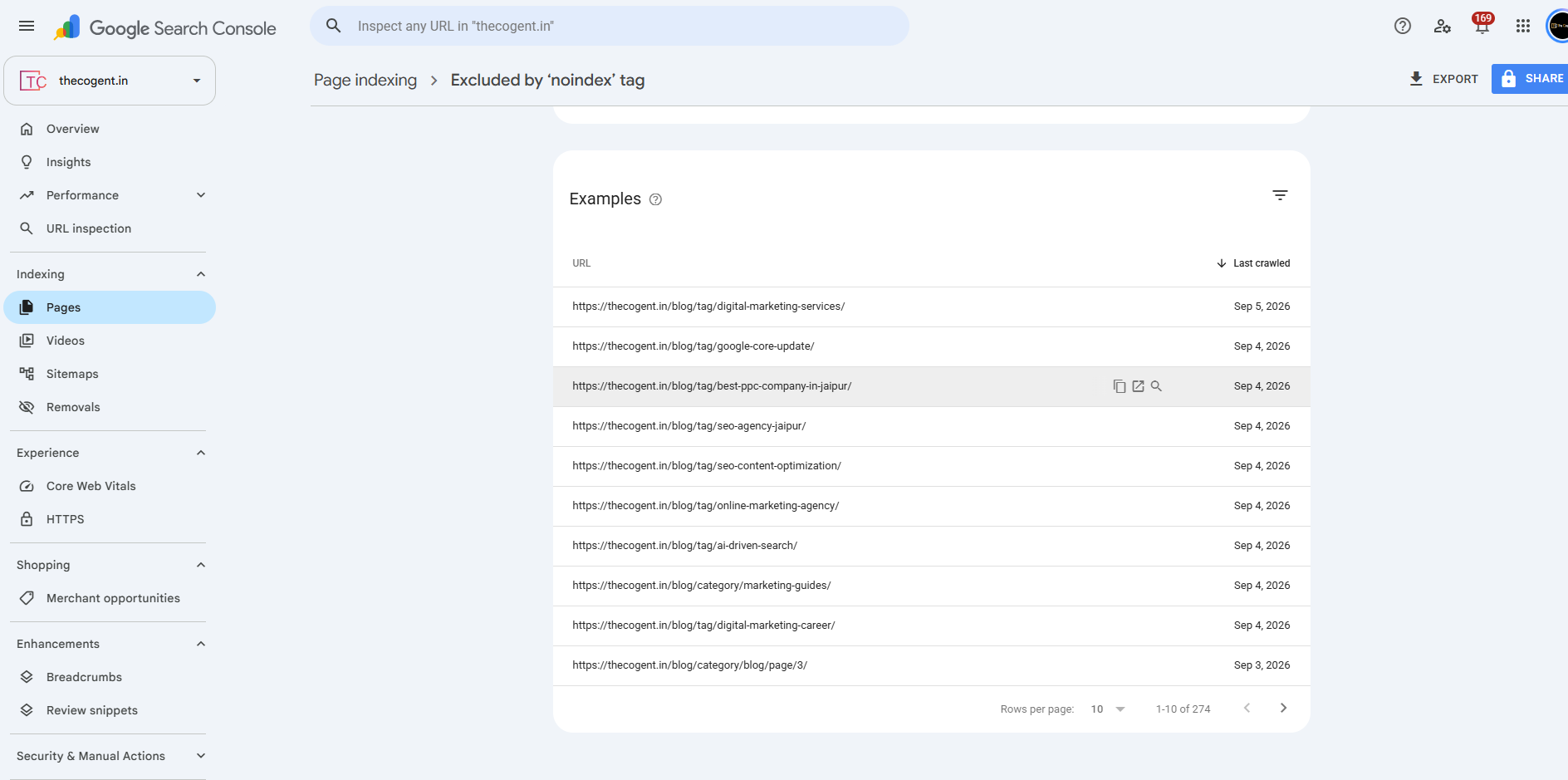
A robots meta tag placed in a page’s HTML head, set to noindex, tells Google not to include that specific page in search results once it’s been crawled and processed.
The NOINDEX robots meta tag appears as follows in your page’s source code:
<meta name=”robots” content=”noindex” />
When to Use X-Robots-Tag
For non-HTML files like PDFs or images, an X-Robots-Tag sent through the HTTP header achieves the same result as a meta tag, since those file types can’t carry HTML meta tags directly. Google Search Central’s noindex documentation confirms both methods are treated equivalently once processed.
HTTP response header (X-Robots-Tag): `X-Robots-Tag: noindex`
Should You Use Robots.txt or Noindex?
The right choice depends entirely on what you’re trying to achieve: stopping crawl access or stopping search appearance. These aren’t interchangeable goals, and the table below maps common scenarios to the correct method.
|
SEO Goal |
Recommended Method |
| Keep a crawlable page out of Google Search | Noindex |
| Stop crawlers requesting selected URLs | Robots.txt |
| Remove an already indexed crawlable page | Allow Crawling + Noindex |
| Prevent a PDF from appearing in Search | X-Robots-Tag: noindex |
| Control crawl access to a folder | Robots.txt |
| Protect confidential information | Authentication / Access Control |
This is also where choosing the right digital marketing agency matters; getting these decisions wrong across dozens or hundreds of URLs compounds quickly, especially on larger sites.
Does Robots.txt Prevent Indexing?
Not reliably, and this is genuinely one of the most misunderstood points in technical SEO. If a URL is disallowed in robots.txt but already has external links pointing to it, Google can still index that URL, sometimes showing it in search results without a description, since it was never allowed to crawl the page to read its content. Blocking crawl access is not the same as guaranteeing exclusion from search.
Can You Use Robots.txt and Noindex Together?
In most cases, these two shouldn’t be used together on the same URL, and understanding why comes down to how Google actually processes a noindex directive.
What Happens When a Noindexed Page Is Blocked by Robots.txt?
If a page carries a noindex tag but robots.txt also blocks it, Google can’t crawl the page to see that noindex tag in the first place. The directive never gets processed, and the page can still end up indexed regardless of the noindex tag remaining unseen in its code.
What Should You Do If the Page Is Already Indexed?
Allow crawling, apply the noindex tag, and let Google recrawl and process it. Once the page drops out of the index, robots.txt can then be applied if crawl access genuinely needs to be restricted afterwards.
Common Robots.txt and Noindex Mistakes to Avoid
A handful of mistakes show up repeatedly across technical SEO audits, and most are avoidable with a basic understanding of how crawling and indexing actually interact.
- Using robots.txt to try to remove URLs already in Google
- Blocking Googlebot before it ever gets to see a noindex tag
- Accidentally noindexing important pages during a site update
- Blocking important CSS or JavaScript resources needed for rendering
- Keeping unnecessary noindexed URLs listed in an XML sitemap
- Using robots.txt or noindex to try to protect private or confidential information
- Forgetting to remove temporary noindex directives after a staging launch
How to Check Whether Robots.txt and Noindex Are Working Correctly
Verifying these settings takes only a few minutes, and it’s worth doing regularly rather than assuming they’re still configured correctly. Small changes during development can quietly break either one without anyone noticing.
Check Robots.txt
Visit the robots.txt file directly in a browser, or review it through Google Search Console, to confirm which folders or URLs currently carry a Disallow directive.
Check the Meta Robots or X-Robots-Tag
View a page’s source code, or inspect the HTTP response headers, to confirm whether a noindex directive is actually present and correctly formatted.
Verify the URL in Google Search Console
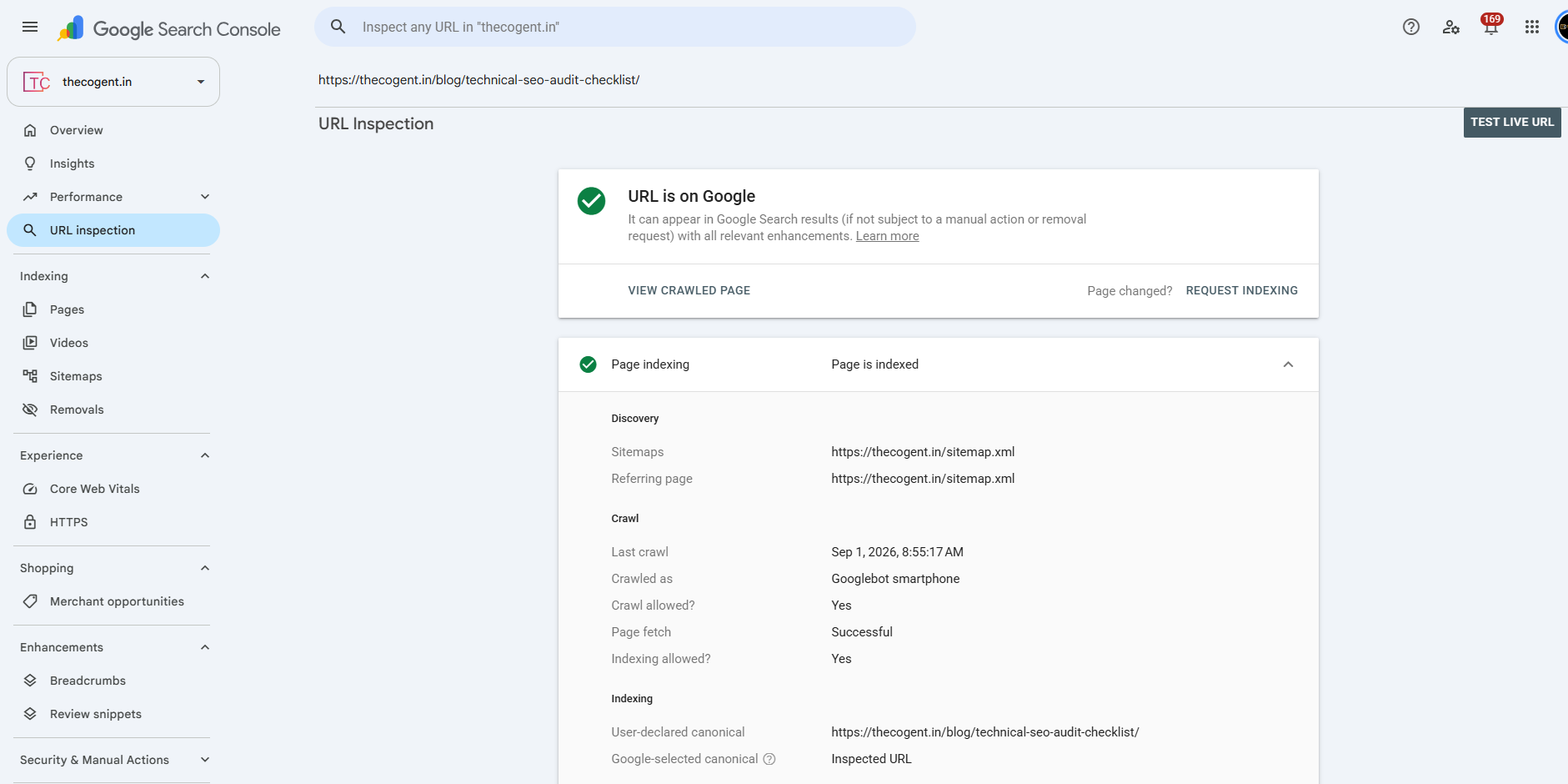
The URL Inspection tool in Google Search Console shows exactly how Google sees a given URL, whether it’s crawlable, whether it’s indexed, and which directive is currently in effect. This is also a natural point to run a broader technical SEO audit checklist across the rest of the site, since crawling and indexing issues rarely show up in isolation.
Why Choose The Cogent for Technical SEO?
Getting crawling and indexing signals right requires more than following a checklist; it requires actually understanding how Google processes a site’s directives end to end. The Cogent works through website crawling and indexing issues as part of a broader technical SEO service, catching conflicts between robots.txt and noindex before they cause a website traffic drop or complicate a Google algorithm update recovery.
If your digital marketing strategy depends on organic visibility, these foundational settings are worth getting reviewed properly by the best digital marketing company in Jaipur. Request a professional technical SEO audit and get a clear picture of what’s actually happening across your site.
Conclusion
Robots.txt and noindex solve two different problems: one controls crawling, the other controls search appearance, and treating them as interchangeable is where most of the trouble starts. Get the distinction right, apply each tool to the situation it was actually built for, and check the results through Google Search Console rather than assuming everything’s working as intended. If your site’s technical setup needs a proper review, get technical SEO assistance from The Cogent and resolve these issues before they affect rankings.
Frequently Asked Questions
Noindex tells search engines not to include a page in search results, while nofollow is a hint that a search engine should not follow a specific link or associate the site with the linked page. Disallow in robots.txt prevents search engine crawlers from accessing a URL or directory.
No. Robots.txt is publicly visible and only affects crawling, not security. Confidential information should be protected through proper authentication or access control, not through a crawl directive.
It varies by site and crawl frequency, but Google generally needs to recrawl the page first to see the noindex tag, after which removal from search results typically follows within a reasonable period.
Generally, no. Sitemaps should list URLs meant to be indexed, and including noindexed pages sends conflicting signals that can create unnecessary confusion during crawling and indexing.
Yes, Google can crawl pages that have a noindex directive. In fact, Google generally needs to crawl a URL to find and process the noindex instruction. Once Google has processed the directive, it may crawl the page less frequently over time.